

Poly VVX 450 OBi
Poly VVX 450 OBi
Support for the Poly VVX 450 OBi: specifications, manuals, how-to articles and setup help from The Tech Team™.
Specifications
VVX 450 OBi specifications
- Poly HD Voice
- Poly Acoustic Clarity technology provides full duplex conversations, acoustic echo cancellation, and background noise suppression
- Poly Acoustic Fence technology eliminates background noise when using a handset or wired headset
- Poly Computer Audio Connector app installed on your PC (Windows only) enables selecting your phone for PC audio in/out to use the phones handset, optional headset and handsfree speakerphone with PC applications
- Individual volume settings with visual feedback for each audio path
- Voice activity detection
- Comfort noise generation
- DTMF tone generation (RFC 2833 and in-band)
- Low delay audio packet transmission
- Adaptive jitter buffers
- 2 USB 2.0 Type-A (for media, storage applications, headset, optional Wi-Fi adapter, optional expansion module)
- 2 RJ-45 (10/100/1000BASE-TX Mbps)
Manuals
VVX 450 OBi manuals & guides
Administrator, user and quick start guides from HP, hosted by smplVoice. Open any guide to read it online or download the PDF.
Top guides
VVX 450 OBi how-to & troubleshooting
The most useful setup and troubleshooting articles from HP's Poly support library.
Software
Software & firmware updates
HP distributes Poly firmware through Poly Lens and its provisioning services rather than as direct downloads. The Tech Team™ can keep your phones current for you.
Related
More Poly VVX Series models

VVX Series · Business IP phones
VVX 150
Support & downloadsPoly VVX 150 OBi
VVX Series · Business IP phones
VVX 150 OBi
Support & downloads
VVX Series · Business IP phones
VVX 230
Support & downloadsVVX Series · Business IP phones
VVX 230 Kit
Support & downloads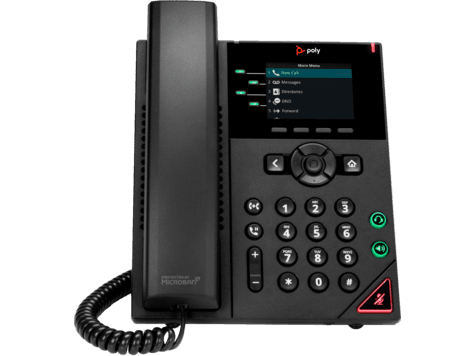
VVX Series · Business IP phones
VVX 250
Support & downloadsNeed help with your VVX 450 OBi?
Tell us a little about your business and a voice specialist will reach out to talk it through.
- A plan built around how your team actually works
- Help moving your existing phone numbers
- Setup and ongoing support from The Tech Team™
Poly and Polycom are trademarks of HP Inc. and its affiliates. Product information, manuals and support articles are published by HP (source) and provided here for reference by smplVoice. Manuals are HP’s original, unmodified files.