

Toshiba manual · Phone user guides
Toshiba IP4100-DECT Cordless Digital Phone User Guide
Published in November 2011, this Toshiba user guide covers the Toshiba IP4100-DECT. It runs 36 pages.
Loading document preview…
About this document
About the IP4100-DECT Cordless Digital Phone User Guide
Published in November 2011, this Toshiba user guide covers the Toshiba IP4100-DECT. It runs 36 pages. Use it to look up how a feature works, what a button or display prompt does, or the steps for a task you don't do every day.
Toshiba closed its phone-system division in 2017, but its phones and systems are still widely used, and our certified Toshiba technicians support them remotely and onsite.
What’s inside
- Title Page
- Introduction
- Important Safety Instructions!
- Features
- Organization
- Conventions
- Related Documents/Media
- Getting Started 1
- Charging the Battery
- Powering on the Handset
- Attaching the Belt Clip
- Basic Operation
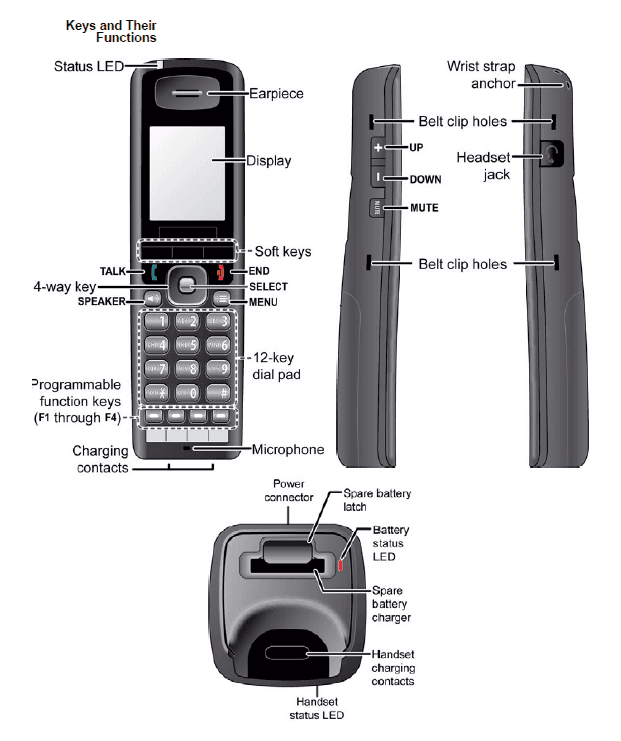
- Keys and Their Functions
- Using the four- way key
- Using soft keys
- Entering text on the handset
- Reading the Display and Status LEDs
- Display icons and what they mean
- LED States
- Using the Menus
- Main Menu Screen
- Contacts Screen (Local Contacts)
- Central Directory Screen (Global Contacts)
- Calls Screen
- Connectivity Screen
- Settings Screen
- Audio Screen
- Alarms Screen
- Using Common Features 2
- Making and Receiving Calls
- Transferring Calls
- Do Not Disturb
- Changing the Audio Volume
- Using the Call Lists
- Using the Contact List and Central Directory
- Navigating the Lists
- Local Contact List Functions
- Adding contacts
- Deleting contacts
- Edit a Contact's Phone Number Before Dialing
Phones covered
Toshiba phones in this document
Related
Related Toshiba manuals & bulletins
- PDFIP4100 Wireless SIP DECT IP Phone Data SheetPDFData sheet2012
- PDFIP4100 DECT Product BulletinPDFBulletinNov 2011
- PDFIP4100 Wireless SIP DECT IP Phone BrochurePDFBrochure2011
FAQ
Questions about this document
Straight answers from the technicians who support these systems every week.
Need help with your Toshiba IP4100-DECT?
Certified technicians, former Toshiba staff among them, supporting Strata and IPedge systems since 1996. Remote or onsite, nationwide.